basic-dns-setup
Basic DNS Setup Project
This project was about learning and practicing the basics of DNS by setting up a custom domain with Namecheap and connecting it to GitHub Pages. Project link : https://roadmap.sh/projects/basic-dns —
🔹 Steps I Followed
1. Buying the Domain
- I purchased the domain
myprojectit.comfrom Namecheap. - Enabled free domain privacy to keep my info safe.
2. DNS Setup
- Went into Namecheap → Advanced DNS.
- Added these records:
- A Records → Pointed
@to GitHub Pages IPs:- 185.199.108.153
- 185.199.109.153
- 185.199.110.153
- 185.199.111.153
- CNAME Record → Pointed
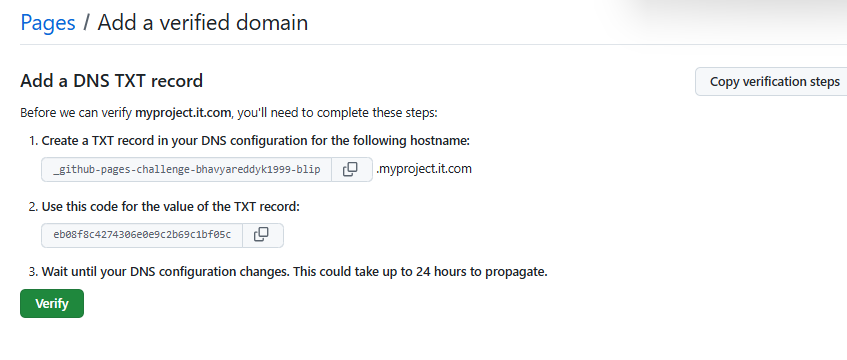
wwwtobhavyareddyk1999-blip.github.io. - TXT Record → Added GitHub verification code for domain ownership.
- A Records → Pointed
3. GitHub Pages Setup
- Created a repo called basic-dns-setup.
- Added an
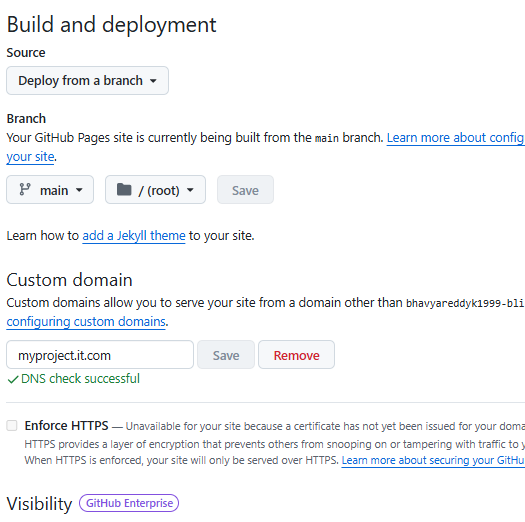
index.htmlfile for the homepage. - Went to Settings → Pages in the repo:
- Source =
main branch /root. - Added Custom Domain:
myprojectit.com. - Enabled ✅ Enforce HTTPS once SSL was ready.
- Source =
4. Result
- Website is now live 🎉
👉 https://myprojectit.com
📸 Screenshots
Here are the screenshots of my setup:
-
Domain purchase

-
Advanced DNS setup

-
GitHub TXT verification
-
GitHub Pages custom domain setup
✅ What I Learned
- How DNS records (A, CNAME, TXT) work.
- How to connect a domain to GitHub Pages.
- How to enable HTTPS for a secure site.